SAP Integration Without BTP: What You Actually Need to Stream SAP Data
Alberth Flores
Last updated: September 2026
SAP integration without BTP works like this: the SAP side is one HTTP RFC destination and the runtime is a Helm chart on any managed Kubernetes, with no SAP Business Technology Platform subscription in the path. This article answers the question with the implementation we run at Onibex, so the shape is general and the numbers are ours.
The 4 key points:
- The documented minimum for a proof of concept is 2 worker nodes, 8 vCPU and 32 GB of RAM in total, the same figure on AWS, Azure and Google Cloud. That is our sizing manual, not a benchmark.
- On the SAP side you configure one destination, an HTTP connection to an external server, Connection Type G, in transaction
SM59. Modeling happens in transactionZONT_ONECMwith zero ABAP development. - The same Helm chart runs on SAP BTP Kyma. It adds five Kyma modules, Istio sidecars and SAP Cloud Connector, and what those buy is a deployment with no LoadBalancer and nothing on the public internet.
- In our own engagements a proof of concept install takes about 10 hours, and the 15-Hour Business Value Challenge ends with live data in Databricks or Snowflake.
What is SAP BTP for, and is it required to move SAP data?
This question usually arrives from one of two people. Either you are the architect who has been told SAP data has to land in Databricks or Snowflake this quarter and the BTP subscription is not on the table, or you already pay for BTP and want to know whether that changes the design. The answer is different for each of you, and both are in here. Start with what the platform is actually for.
SAP Business Technology Platform is SAP's own platform for side-by-side extension and integration, and the services in it solve real problems. SAP Integration Suite mediates APIs and orchestrates process integration across the estate. Event Mesh distributes events between SAP and non-SAP applications. Enterprise Event Enablement is the S/4HANA framework that publishes business events out to that mesh (SAP Help Portal, Enterprise Event Enablement).
That last one matters here, because it shows how SAP itself gets an event out of the system. The channel that carries those events out is configured against a destination, and destinations live in transaction SM59.
Look at where that leaves the SAP system. The event still leaves through a destination you configure in SM59, the same transaction, the same kind of object. Which platform you point that destination at is a decision about where the data is going, not about whether SAP can send it.
So the honest answer is that BTP is required for what BTP does, and feeding a lakehouse is a different job. If your goal is a governed copy of SAP sales orders in Databricks, Snowflake or ClickHouse, the question is not which SAP subscription or licensing you need. It is which Kubernetes cluster you want to run the pipeline on, and that includes an on-premise deployment if that is where your team already operates.
What does Onibex build?
The rest of this article is a walkthrough rather than a survey, so it is only fair to say up front whose implementation you are looking at. Onibex builds real-time SAP data products and the AI-ready semantic layer on top of them. We use ours as the worked example because it is the one whose sizing table, install times and failure modes we can actually show you, and the architecture generalizes past us.
The product that does the extraction is Onibex One Connect, a real-time SAP data streaming platform. The SAP Data Modeler runs inside SAP as a transport package, reached through transaction ZONT_ONECM, and it is where a data product is designed by connecting tables and CDS views with inner or left outer joins. No ABAP development is required for that modeling.
The Smart Gateway runs on Kubernetes. It receives the data and the metadata, generates the topics and the schemas, and serializes to Apache Avro against Confluent Schema Registry. The Premium Kafka Connectors then deliver into Databricks, Snowflake or ClickHouse, and the One Connect Data Market ships more than 150 pre-packaged SAP data products so that most are extended rather than built from scratch.
All of it runs as an external layer, so the SAP clean core stays intact: extraction uses standard SAP mechanisms and no custom enhancements to standard SAP objects are required.
Onibex is an SAP Silver Partner and a Confluent Gold Partner, and the platform is listed on the SAP partner directory. Supported releases are SAP ECC, SAP S/4HANA and RISE with SAP on AWS, and for SAP S/4HANA Cloud the supported deployment is Private Edition.
What do you actually need to stream SAP data without BTP?
Four things, and only the first one lives inside SAP. This is how we assemble them with One Connect, and the four slots are the same whoever fills them, which is the useful part to steal if you are evaluating something else.
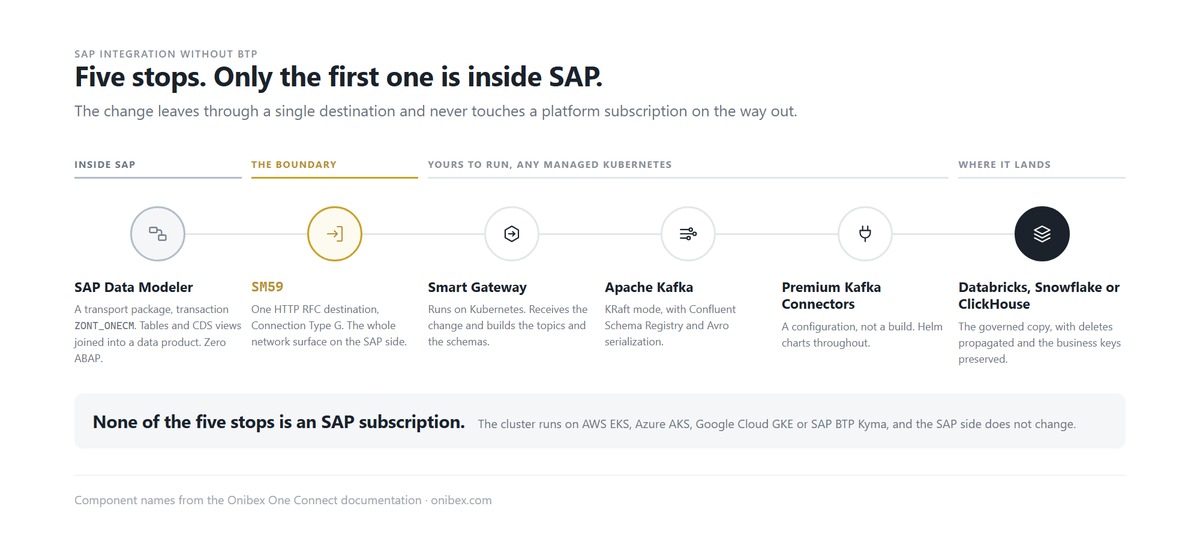
The SAP Data Modeler is installed as a transport package and it is where you declare the data product. The changes it reacts to are SAP business events, which is SAP announcing that a business object was created, changed or deleted, rather than a row that moved.
The second is the way out: an HTTP RFC destination, Connection Type G, configured in SM59. That is the whole network surface on the SAP side. It is also exactly what the BTP path configures, which is the point of the previous section.
The third is a Kubernetes cluster running the Smart Gateway, Apache Kafka in KRaft mode, Confluent Schema Registry and the Strimzi operator that manages the Kafka cluster. All of it installs from Helm charts. One detail worth knowing because it dates an article that gets it wrong: Kafka Connect is not deployed by the Kafka chart any more, the Smart Gateway launches a Kafka Connect deployment per workspace.
The fourth is the destination connector, and that is a configuration rather than a build. None of the four is an SAP subscription.
What does the runtime cost you in infrastructure?
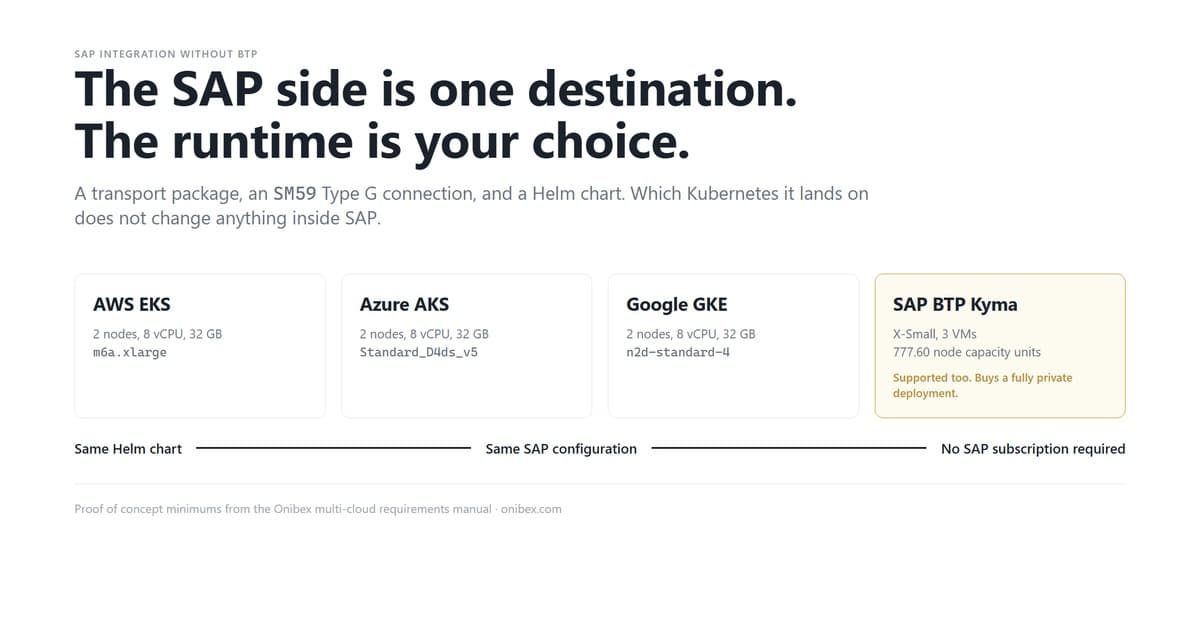
Less than most teams assume, and the number is identical across the three hyperscalers. Our multi-cloud requirements manual sizes a proof of concept cluster at two worker nodes with 4 vCPU and 16 GB of RAM each, which totals 8 vCPU and 32 GB, on a managed control plane.
The instance types differ and the capacity does not: m6a.xlarge on AWS EKS, Standard_D4ds_v5 on Azure AKS, n2d-standard-4 on Google Cloud GKE. That is a proof of concept minimum from our own manual, not a production sizing and not a measured load profile. Production sizing follows record volume and belongs in a conversation, not in a table.
Two numbers on time, and both are ours rather than an industry average. A proof of concept installation takes approximately 10 hours, which puts a customer testing on their own premises inside a couple of business days. The 15-Hour Business Value Challenge is the same work carried through to pre-packaged business data products landing live in Databricks or Snowflake.
What changes if you already run SAP BTP?
The chart still works, and this is the part worth saying plainly: SAP BTP Kyma is a supported target, documented step by step, not a workaround. Kyma is SAP's managed Kubernetes environment, so the Smart Gateway runs there the same way it runs on EKS.
The BTP path is sized in capacity units rather than instance types. Our manual lists two T-shirt sizes: X-Small at 2 vCPU and 8 GB per node across 3 virtual machines with 128 GB of storage, which is 777.60 node capacity units and 115.20 storage capacity units, and Small at 4 vCPU and 16 GB across 4 virtual machines with 256 GB, which is 1,382.40 and 230.40. Which one you pick depends on the record volume you expect. Converting capacity units to money is SAP's own BTP estimator, so we link it rather than guess it.
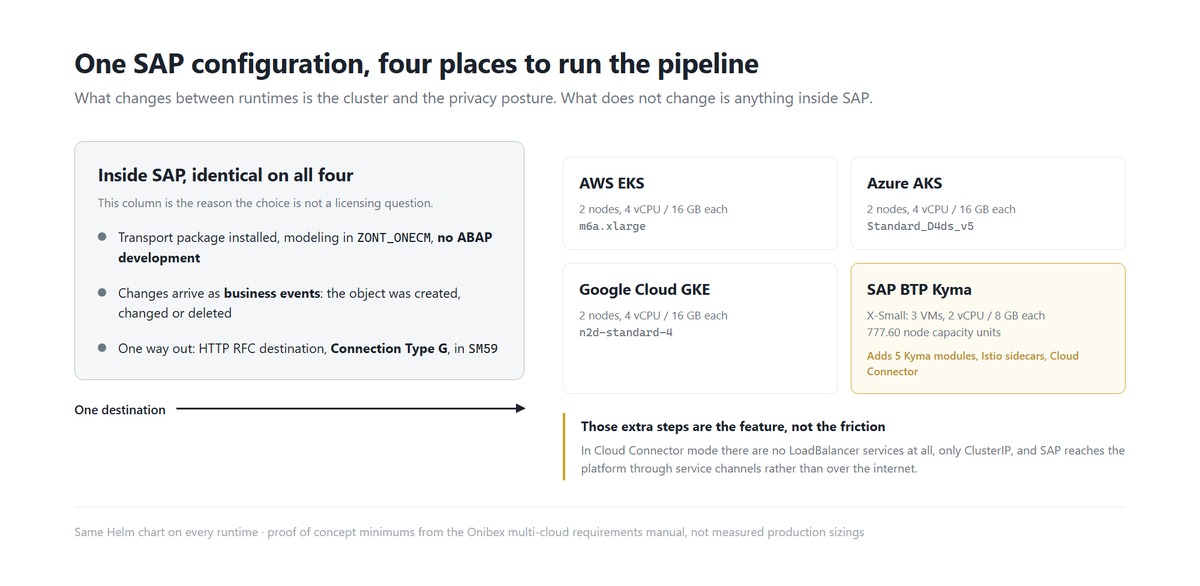
The Kyma deployment also asks for more steps than a plain EKS install, and they are not friction, they are the feature. Five Kyma modules have to reach Ready: api-gateway, btp-operator, connectivity-proxy, istio and transparent-proxy. Istio sidecar injection goes on, after which every pod reports 2/2 READY instead of 1/1. SAP Cloud Connector is installed in the on-premise network and opens an outbound tunnel, with no inbound firewall ports required.
What all of that buys is a private cloud posture where nothing is exposed. In Cloud Connector mode there are no LoadBalancer services at all, only ClusterIP, and SAP reaches the platform through three service channels rather than over the internet. If your security team wants that shape, BTP is the fastest way to get it, and the same chart supports an open LoadBalancer mode when it is not required.
Bring your own cloud, BYOC, is the other route to a deployment that lives inside your own account, and there are separate architecture guides for it on AWS and on Azure. What BTP removes is the work of assembling that posture yourself: SAP manages the Kubernetes environment, and the tunnel is a product rather than a design.
Which runtime should you choose?
The choice is about where your team already operates and how private the deployment has to be. The SAP side is constant across every column.
| AWS EKS | Azure AKS | Google Cloud GKE | SAP BTP Kyma | |
|---|---|---|---|---|
| Deployment method | Helm chart | Helm chart | Helm chart | Same Helm chart |
| Documented proof of concept size | 2 nodes, 8 vCPU, 32 GB | 2 nodes, 8 vCPU, 32 GB | 2 nodes, 8 vCPU, 32 GB | X-Small or Small T-shirt size |
| Sizing unit | m6a.xlarge |
Standard_D4ds_v5 |
n2d-standard-4 |
Capacity units, 777.60 at X-Small |
| Kafka stack | Strimzi, Apache Kafka in KRaft mode, Schema Registry | Same | Same | Same |
| Extra platform setup | none | none | none | 5 Kyma modules, Istio sidecars, Cloud Connector |
| Public exposure | LoadBalancer by default | LoadBalancer by default | LoadBalancer by default | None in Cloud Connector mode, ClusterIP only |
| SAP side | SM59 Type G destination |
Same | Same | Same, pointed at the Cloud Connector host |
| SAP subscription required | No | No | No | BTP, which you already have |
For a tool by tool view of the alternatives rather than the runtimes, we compared SLT, Datasphere and Fivetran separately, and this piece deliberately does not repeat it.
What does this approach not do?
It does not replace SAP Integration Suite. API mediation, process orchestration and B2B scenarios are what that product is for, and a streaming pipeline into a lakehouse does not cover them.
It does not remove the need for a Kubernetes operator. Somebody owns that cluster, and if nobody on the team does, BTP Kyma is a reasonable answer precisely because SAP manages it.
It does not make an answer correct. What a governed pipeline gives you is data that is grounded and traceable, with deletes propagated and the business keys preserved. Correctness is decided a layer up, by whatever reads this data, which is a different problem with a different answer.
And it does not skip coverage work. A standard business event may not exist for the exact field you need, and extending it is real effort that belongs in the estimate rather than in the demo.
Frequently asked questions
Do I need SAP BTP to stream SAP data to Kafka?
No. The SAP side of the pipeline is a transport package plus one HTTP RFC destination of Connection Type G configured in SM59, and the runtime is a Helm chart on any managed Kubernetes service. Onibex One Connect, a real-time SAP data streaming platform, deploys on AWS EKS, Azure AKS, Google Cloud GKE or SAP BTP Kyma, and the SAP-side configuration is the same on all four.
Can Onibex One Connect run on SAP BTP?
Yes, on BTP Kyma, and it is documented step by step rather than improvised. The deployment adds five Kyma modules, Istio sidecar injection and SAP Cloud Connector, and in Cloud Connector mode it creates no LoadBalancer services, so nothing is exposed to the public internet.
What is the minimum infrastructure for a proof of concept?
Two worker nodes with 4 vCPU and 16 GB of RAM each, which is 8 vCPU and 32 GB in total, on a managed control plane. That figure is identical on AWS, Azure and Google Cloud in our own requirements manual, and on BTP Kyma the equivalent starting point is the X-Small T-shirt size at 777.60 node capacity units.
Does this require ABAP development?
No. Data products are modeled visually in transaction ZONT_ONECM by connecting tables and CDS views with inner or left outer joins. Reusable ABAP templates exist for advanced cases such as streaming custom Z tables, and those are adapted rather than written from scratch.
How long does it take to get SAP data into Databricks or Snowflake?
In our own engagements, a proof of concept installation takes approximately 10 hours, and the 15-Hour Business Value Challenge ends with pre-packaged business data products landing live in Databricks or Snowflake. Those are Onibex figures from Onibex deployments, not an industry benchmark.
What SAP releases are supported?
SAP ECC and SAP S/4HANA, and for SAP S/4HANA Cloud the supported deployment is Private Edition. SAP BW is supported for standard and custom extractors.
Ready to see it on your own system? Talk to us about the 15-Hour Business Value Challenge and we will size the cluster with you before anything is installed.
Technical reference: the full deployment steps for every runtime, including the SAP BTP Kyma path and the sizing table quoted here, are documented in oneconnect-docs.
Alberth Flores is a data engineer at Onibex, where he works on SAP data products and on ASK, the semantic layer for AI agents. Onibex builds real-time SAP data products and the AI-ready semantic layer on top of them.
About Onibex: Onibex is an SAP Silver Partner and Confluent Gold Partner building real-time SAP data hyperconnectivity for the enterprise. Its flagship platform, Onibex One Connect, streams SAP ECC and SAP S/4HANA business events to Apache Kafka, Confluent Cloud, Databricks, Snowflake, and other destinations in real time. Onibex also maintains ASK (Agentic Semantic Knowledge), a semantic-layer standard that grounds AI agents in governed, business-ready SAP data. Onibex is headquartered in The Woodlands, Texas.
Apache, Apache Kafka, Kafka and Apache Avro are either registered trademarks or trademarks of The Apache Software Foundation in the United States and/or other countries. SAP, SAP ECC, SAP S/4HANA, SAP BTP and other SAP products mentioned are trademarks or registered trademarks of SAP SE in Germany and other countries. Kubernetes is a registered trademark of The Linux Foundation.