Real-Time SAP to Databricks Integration with Onibex OneConnect
Onibex Team
Last updated: August 2026
What is real-time SAP to Databricks integration?
This architecture delivers SAP ECC and SAP S/4HANA business events to Databricks Delta tables continuously through Apache Kafka, without polling, without ABAP development, and without manual schema management. Onibex OneConnect handles capture, serialization, schema registration, and topic creation automatically, from the moment a record changes in SAP.
The 4 key points:
- SAP business events — ABAP RESTful Application Programming (RAP), Business Object Repository (BOR), Business Transaction Events (BTE), and Post Processing Framework (PPF) — fire at the application layer the instant a record is created, modified, or deleted, not on a fixed polling schedule
- The Smart Gateway serializes each record into Avro format, registers the schema automatically in the Schema Registry, and creates the Kafka topic with no manual configuration
- The Onibex Databricks connector reads each topic and lands SAP tables as Delta tables with
enableChangeDataFeedturned on by default, enabling Change Data Capture (CDC) pipelines without full-snapshot reprocessing - The SAP Data Modeler exposes VBAK, VBAP, custom Z-tables, and Core Data Services (CDS) Views through a visual drag-and-drop interface, with no ABAP code at any step
How does OneConnect model SAP tables for Databricks?
A sales order in SAP ECC and SAP S/4HANA lives across two tables: VBAK (the header: customer, document date, sales organization) and VBAP (the line items: material, quantity, net value). Modeling that relationship for Databricks starts inside the Onibex SAP Data Modeler, described in detail in SAP Data Modeler and self-describing data.
The SAP Data Modeler provides a visual interface where VBAK and VBAP are added, connected by dragging and dropping, and field aliases are assigned. NETWR becomes "net value." KUNNR becomes "customer." No SQL, no ABAP function modules, and no developer dependency for every schema change.
The output is a data product: a complete business package with its tables, relationships, and aliases resolved. Once built, it is reusable for any future destination (Snowflake, PostgreSQL, a dashboard, Databricks) without rebuilding the SAP logic from scratch.
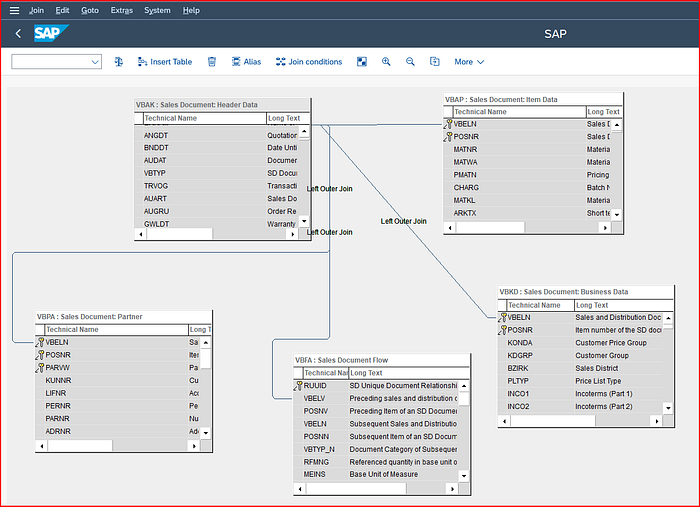
Data product design for Sales Order in the SAP Data Modeler
The SAP Data Modeler also supports custom Z-tables and CDS Views directly, so custom fields and existing CDS Views built for internal reporting are pulled in without re-implementing that logic inside the tool.
Worth noting: no special configuration is needed on the SAP side for the data to land cleanly in Databricks. The SAP Data Modeler produces a structured, destination-agnostic data product. The same model that feeds Databricks today can feed Snowflake or Confluent Cloud tomorrow without touching the SAP configuration again.
How do SAP business events guarantee real-time delivery?
The SAP Data Modeler resolves the structure of the data. Business events resolve the timing.
Every time a sales order is created, modified, or deleted in SAP, an application-layer business event tied to that entity fires. On SAP ECC and SAP S/4HANA installations up to 2022, this runs on BOR Events. On SAP S/4HANA 2023 and later, it runs on RAP Events. The result is the same in both cases: the modified record travels outbound over an HTTP Remote Function Call (RFC) destination of Type G to the Smart Gateway the instant the change is committed, without waiting for a scheduled extraction job.
This is the property that ensures data later consumed by Databricks, a dashboard, or an AI agent is current by design. The change is already in transit from the moment it is committed in SAP.
The same mechanism governs deletes. A delete in SAP triggers the same application-layer business event as a create or update. Delete propagation is part of the design at the source, not a step added afterward in the pipeline.
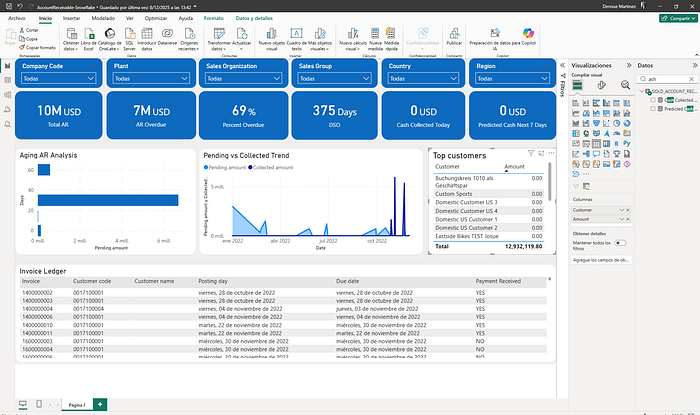
Example of a Power BI dashboard connected to Databricks, using the VBAK, VBAP, VBRK, VBRP tables
What does the Smart Gateway do between SAP and Kafka?
Once VBAK and VBAP are modeled and connected to their business events, the Smart Gateway (documented in SAP to Kafka integration with OneConnect) takes over. It performs four steps automatically:
- Receives the delta from SAP. The modified record, whether an insert, update, or delete, arrives at the Smart Gateway at the moment the business event fires, pushed over the RFC Type G destination.
- Serializes the record into Avro format. Avro enforces a defined type for every field and validates each record before writing. This prevents a field from arriving as a string in one record and null in the next, the kind of inconsistency that breaks a downstream pipeline without warning.
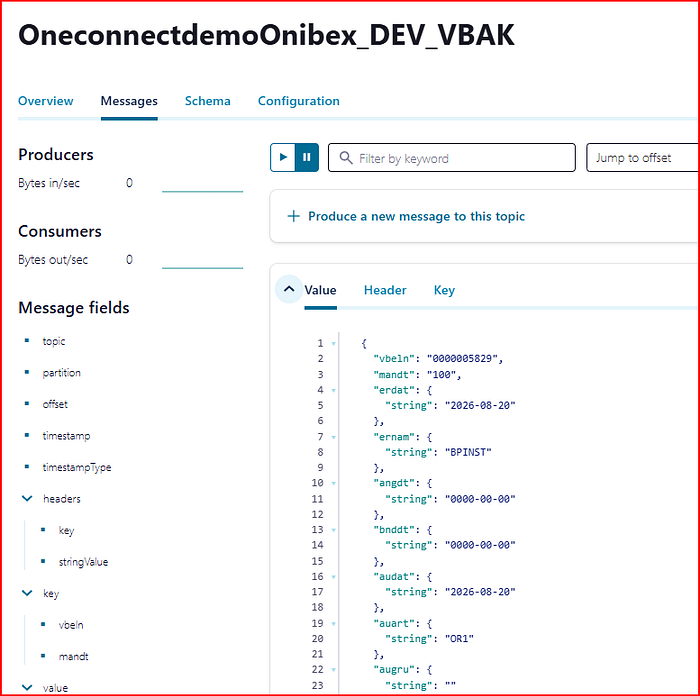
VBAK topic message serialized in Avro
- Registers the schema in the Schema Registry. The schema for each data product is generated automatically from the metadata the SAP Data Modeler already holds about VBAK and VBAP. No manual schema authoring is required.
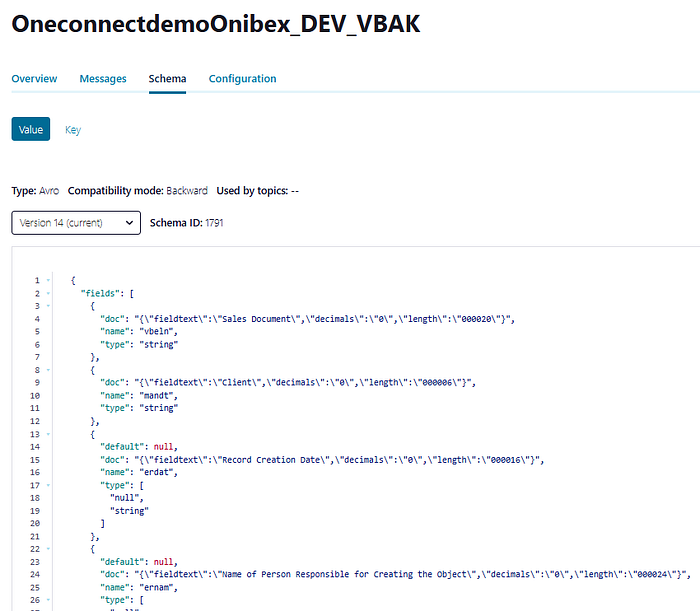
Avro schema registry for the VBAK topic
- Creates the Kafka topic automatically. The topic name is based on the entity, and the topic is ready from the moment the data product is activated on Apache Kafka.
From that point forward, every change to the sales order writes a new Avro record to the topic, with the schema enforced by the registry.
How does the Onibex connector land SAP data in Databricks Delta tables?
The Onibex Kafka Connect connector for Databricks is configured directly from the Smart Gateway interface, without a separate Kafka Connect deployment to operate.
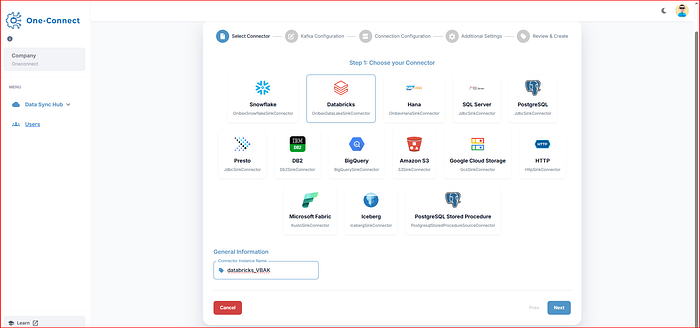
Pre-loaded connectors in the Smart Gateway
It reads the sales order topic using the same schema registry entry the Smart Gateway wrote, so the input schema and the output schema are guaranteed to match: they are the same contract read at both ends, with no separate mapping step where drift could occur.
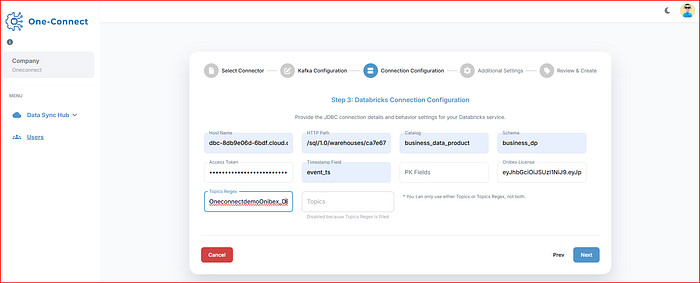
Easy configuration to create connectors
Each SAP table lands as its own Delta table in Databricks. VBAK arrives as one Delta table, VBAP as another, both continuously synced. Both have enableChangeDataFeed turned on by default, which means Delta records every insert, update, and delete as a readable stream. That property is what makes a real-time CDC pipeline possible on top of the bronze layer, instead of reprocessing full snapshots on every run.
| Step | What happens | Configured by |
|---|---|---|
| SAP Data Modeler | VBAK and VBAP joined, business aliases assigned | Analyst or architect, no ABAP |
| Business event | Change captured at application layer, sent over RFC Type G | Automatic on every commit |
| Smart Gateway | Avro serialization, schema registration, Kafka topic creation | Automatic |
| Databricks connector | Topic consumed, Delta table written, change feed enabled | Configured from Smart Gateway UI |
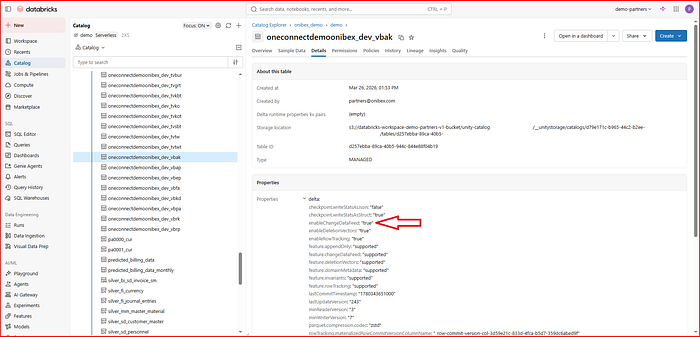
Automatic configuration of the tables created with the Onibex Databricks connector, including the enableChangeDataFeed property
How are Silver and Gold layers built on SAP Delta tables?
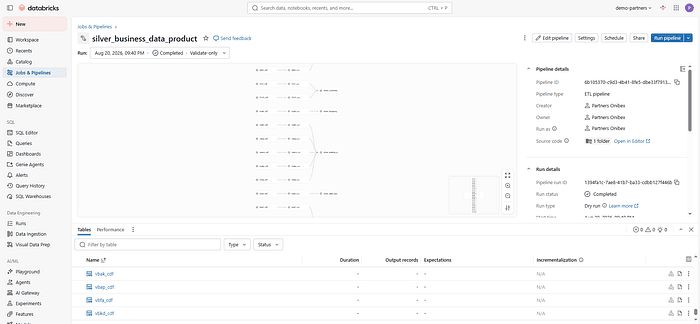
With VBAK and VBAP landing as bronze Delta tables with change feed enabled, the silver and gold layers follow the streaming CDC pattern documented in SAP to Databricks streaming pipeline: read the change feed as a stream, apply inserts, updates, and deletes onto a current-state table using SAP business keys, and propagate deletes with apply_as_deletes to avoid ghost records.
For the sales order, the silver layer produces a consolidated table that joins VBAK and VBAP into a single reusable entity, with column names that preserve traceability back to the source table.
The gold layer enriches the silver data with text tables (customer name, material description), derives calculated fields the business needs, and renames columns to business terms. What was vbeln, matnr, and netwr in bronze becomes sales_order, material, and net_value in gold. That is the kind of table a dashboard query or an Onibex ASK (Agentic Semantic Knowledge) agent can read without an SAP data dictionary alongside it.
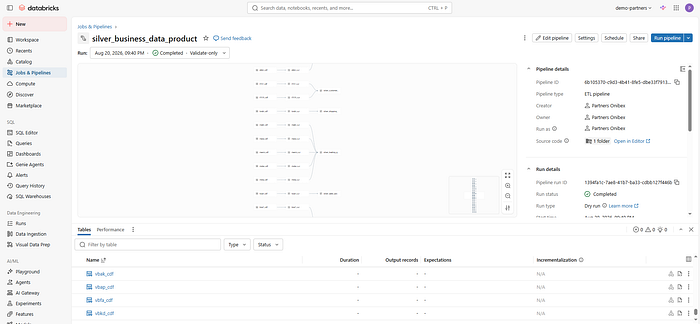
Design of Databricks pipelines for real-time data transformation to generate the Silver and Gold tables of the medallion architecture
The same pattern applies to any data product in the SAP Data Modeler: billing documents (VBRK, VBRP), material masters, customers, vendors, or any Z-table or CDS View in the SAP installation.
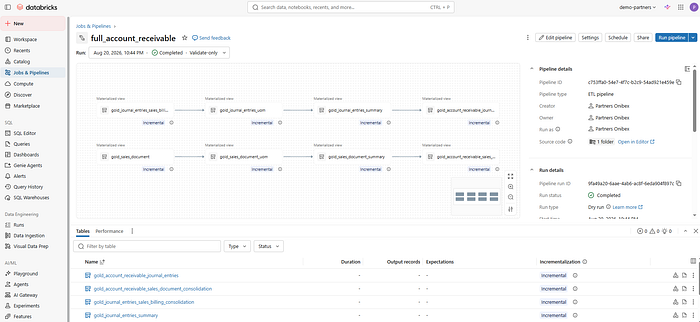
Design of Databricks pipelines for real-time data transformation: accounts receivable Gold layer
Frequently asked questions
Does real-time SAP to Databricks integration require ABAP development?
No. The SAP Data Modeler provides a visual drag-and-drop interface for defining the data product, and the Smart Gateway automatically manages Avro schemas, Schema Registry entries, and Kafka topic creation. No ABAP function modules or custom extractors are written at any step of the OneConnect flow.
What if the SAP installation has custom Z-tables or CDS Views?
The SAP Data Modeler supports Z-tables and CDS Views the same way it supports standard SAP tables. They are inserted into the data product, joined with standard tables through the visual interface, and filtered to the fields that should leave SAP, all from the same tool.
How does Databricks detect that something changed in SAP?
Every SAP table delivered by the Onibex connector arrives with enableChangeDataFeed enabled by default. That means Databricks pipelines can read inserts, updates, and deletes as a continuous stream instead of comparing snapshots. The change is already recorded in the Delta feed from the moment it lands from Kafka.
Can deletes be lost in this flow?
No. A delete in SAP ECC or SAP S/4HANA triggers the same application-layer business event as a create or update. Delete propagation is designed in at the source through the business event mechanism, carried through to Databricks via apply_as_deletes in the CDC pipeline.
What OneConnect does not do
OneConnect does not read from the SAP database layer. All capture happens through application-layer business events (RAP, BOR, BTE, PPF) pushed outbound over an HTTP RFC destination of Type G to the Smart Gateway. No direct database access is involved on the SAP side.
OneConnect does not build the Silver and Gold layers in Databricks. The bronze Delta tables with change feed enabled are the handoff point. The medallion architecture above bronze is designed and maintained by the Databricks team using standard Databricks pipeline tooling.
OneConnect does not support SAP S/4HANA Cloud Public Edition. The supported systems are SAP ECC, SAP S/4HANA, and SAP S/4HANA Cloud Private Edition.
OneConnect does not require a separate Kafka Connect cluster to write to Databricks. The Databricks connector is configured and managed from the Smart Gateway interface, with no additional infrastructure to operate.
About Onibex
Onibex builds real-time data streaming and agentic AI solutions for SAP environments. Onibex OneConnect captures business events from SAP ECC and SAP S/4HANA through application-layer mechanisms (RAP, BOR, BTE, PPF), pushes them over an RFC destination of Type G to the Smart Gateway, and streams them to Apache Kafka, Confluent Cloud, Databricks, Snowflake, and other targets, with topics and Schema Registry entries created automatically and schema evolution supported.
Onibex ASK (Agentic Semantic Knowledge) provides a semantic layer for querying SAP data through natural language agents. Source code for OneConnect is available at the oneconnect-docs GitHub repository. Learn more at onibex.com.